Piano Music & Songs
- 3.7
- Rating
- 10.00M
- Installs
- Free
- Price
 Analysis by App-foxy
I approached Piano Music & Songs expecting a small, straightforward music game rather than a full piano-learning course, and that expectation shaped my first impression. It is a free Android game from Indocipta Studio, built around the simple idea of putting a piano keyboard on a phone or tablet. The appeal is immediate: open it, place a finger on the keys, and start making sound without setting up an instrument.
That simplicity is both its identity and its main limitation. I found it easy to understand because there is very little between me and the keyboard. At the same time, anyone looking for a structured lesson plan, detailed theory, or the response of a real digital piano will probably outgrow it quickly. This works best as a casual music experience, a compact way to experiment with notes, and a gentle first step for someone curious about piano.
The game is free to download and carries an Everyone age rating, which makes it suitable for family use when the goal is relaxed exploration rather than serious training. Its average rating is 3.7 from around 9,000 ratings, and it has passed 10 million installs. Those figures suggest a broad audience, but they do not change the practical question I would ask before installing it: do you want a pocket keyboard for quick play, or a complete learning environment?
You May Also Like

 Blood Strike: 2.5 Anniversary
Blood Strike’s Loadouts Turn Every Drop Into a Tactical Gamble
A close look at Blood Strike’s custom loadouts: how fast access to signature weapons reshapes its battle royale rhythm, rewards preparation, and narrows the gap between fights.

 Pandora - Music & Podcasts
Pandora’s Music Is Easy to Start, but Harder to Recover
Pandora’s strength is its low-effort path from a seed to a station. Its weak spot is how much confidence it asks you to place in connection, setup, and quiet recovery.

 8 Ball Pool
 Is Built on Rivalries, Rematches, and Routine
A close look at the rivalries, rematches, shared routines, and unanswered safety questions that turn a quick pool match into a persistent mobile community.

 Samsung Music
’s Quiet Strength Is Playing What You Already Own
Its reach comes less from spectacle than from dependable access to a personal library. That simplicity is both the app’s strongest retention engine and its ceiling.

 AccuWeather: Weather Radar
AccuWeather Review: A Quick, Clear Forecast for Everyday Decisions
For everyday plans, the best forecast is the one you can understand quickly. AccuWeather makes rain timing, radar, and local conditions easy to act on, with a few trade-offs.

 Hill Climb Racing
Why Hill Climb Racing Still Turns Crashes Into One More Run
A tiny car, a bumpy hill and one more upgrade: Hill Climb Racing keeps resurfacing because its simple chaos makes every near-miss feel personal.
More From Our News Desk



How the first session feels on a phone
On a touchscreen, the first few seconds matter. A piano app can become frustrating if the keys are cramped, the controls are unclear, or the interface makes a simple action feel like a technical task. Here, the central idea is easy to grasp. I can treat the display like a small keyboard and tap notes directly, which makes the game approachable even for someone who has never touched a piano.
The phone format changes the experience in a useful way. I do not need a table, a power cable, or a separate instrument. If I have a quiet moment while waiting for an appointment or relaxing at home, I can use that time to test a melody or play a few chords. The result is less formal than sitting at a piano, but it is also less intimidating. There is no pressure to perform correctly before I begin.
Tablet play makes more sense when I want room for both hands. A phone can be convenient, but its narrow screen naturally limits how comfortably I can spread my fingers. I would use the smaller device for short sessions and simple patterns, while a tablet is the better choice for anyone who wants a more spacious playing surface. This is an important practical distinction that is easy to miss when an app is described simply as a piano keyboard.
I also think the free entry point helps the game find its audience. A parent can let a child explore musical notes without first buying an instrument, and a beginner can decide whether touchscreen playing feels enjoyable before committing to a more advanced app or hardware. The trade-off is that a low-friction toy-like experience cannot replace the physical feedback of weighted keys or the discipline of regular lessons.
The current version is 1.8.10, and the listed minimum operating system is Android 7.1. That keeps the app relevant to a wide range of Android devices, including phones that are not recent. Still, the age of a device can affect the experience even when the operating system is supported. A smaller display, weaker touch response, or an older speaker can make fast playing less comfortable than the basic compatibility information suggests.
A visual language built around access
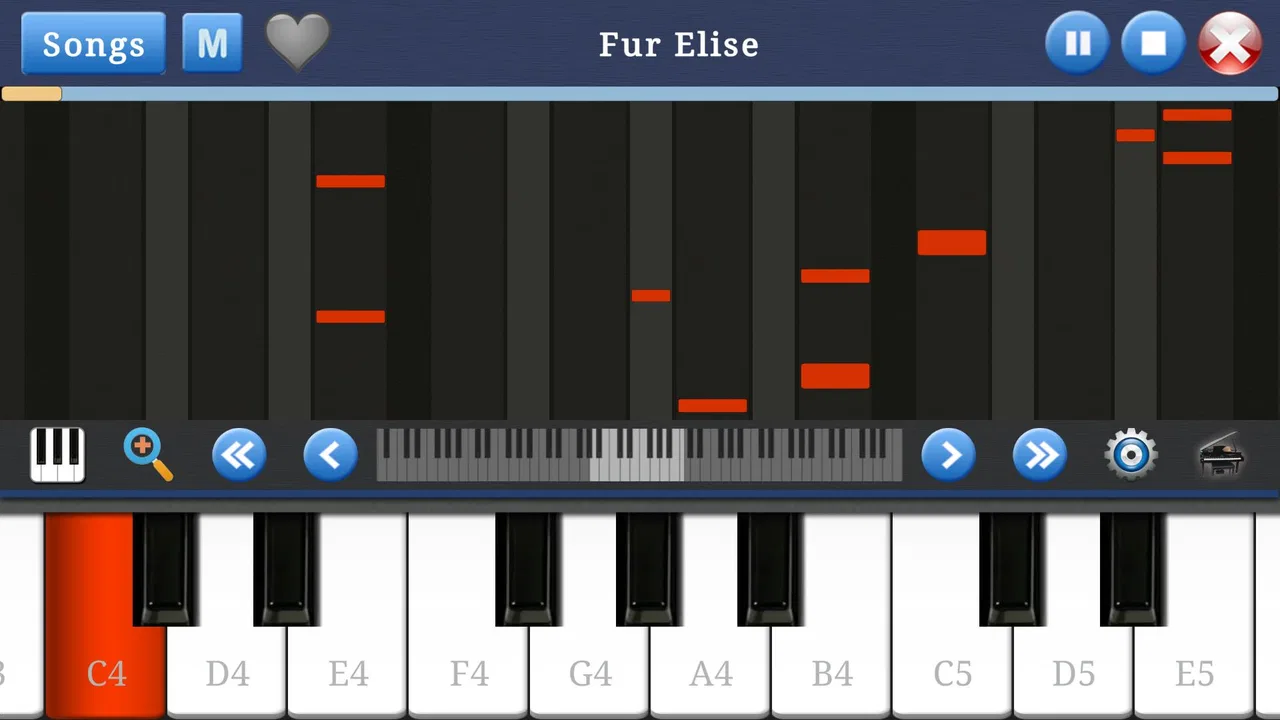
The visual identity is most effective when it stays out of the way. A piano keyboard has a familiar shape, and that familiarity gives the game a clear visual language without needing elaborate scenery. White and black keys communicate their purpose immediately, so I can focus on the relationship between position and pitch instead of learning a complicated interface.
That restraint creates a particular mood. This is not a game that tries to turn music into a large fantasy adventure or surround every action with visual effects. Its world is the instrument itself. The screen becomes a small, self-contained playing space, and the lack of a heavy narrative keeps the attention on sound, timing, and touch.
I appreciate that approach because it matches the scale of the activity. When I want to make a few notes during a break, a busy interface would feel like an obstacle. The keyboard gives the experience a calm, practical character. It feels closer to opening a pocket instrument than entering a conventional game world, even though it sits in the Music category.
The same minimalism may feel plain to players who expect a stronger sense of progression. Visual rewards, animated environments, and elaborate presentation can make rhythm games feel more energetic. Piano Music & Songs instead creates its mood through concentration. The setting is quiet and direct, which suits experimentation but may not hold the attention of someone who needs constant visual stimulation.
One useful way to approach the screen is to treat it as a sketchpad rather than a stage. I can try a short phrase, stop, change the starting note, and compare the result. That makes the game valuable for small musical ideas. It is not only about reproducing a song; it can also be a place to hear how a melody changes when I move it higher or lower.
Sound, rhythm, and the limits of a touchscreen instrument
Sound is naturally the centre of this experience. Every tap has to feel immediate enough for a player to connect finger movement with the note being produced. When that connection works, the keyboard becomes satisfying even without a large feature set. I can hear the result of a simple pattern right away, which encourages trial and error.
I found the strongest use case in short musical exercises. Instead of trying to play an entire complicated piece, I would begin with a few notes, repeat them, and gradually add movement. This keeps the rhythm manageable and makes the game less demanding on a small screen. It also gives beginners a practical way to develop finger familiarity without being buried in instructions.
There is a subtle difference between playing notes and learning rhythm. A touchscreen can let me choose the correct keys, but it does not automatically teach me why one note should last longer than another. For that reason, I would use a metronome or another timing aid separately if I were practising seriously. The game can support musical curiosity, but I would not treat it as a complete replacement for guided rhythm training.
The speaker on a phone also affects the mood. Built-in speakers are convenient for private experimentation, yet they can make repeated notes sound thin or harsh at higher volume. Headphones may give a cleaner experience, especially when I am testing a melody several times. That is not a flaw unique to this game; it is part of the compromise of using a mobile device as an instrument.
One of my favourite practical habits is to keep the first session deliberately quiet and slow. I listen for whether my taps arrive evenly rather than rushing to play a recognisable tune. This changes the game from random tapping into a small rhythm exercise. It also reveals the difference between knowing which key to press and being able to place that key at the right moment.
Players should also keep expectations realistic about expression. A physical piano responds to pressure, subtle release, and the movement of a real mechanism. A touchscreen keyboard is more limited because the finger is interacting with a flat surface. That makes this app useful for notes, patterns, and basic melodies, but less convincing for expressive performance where touch dynamics are central.
Where the mechanics fit—and where they stop
The core mechanic is refreshingly readable: touch the keyboard and make music. That directness is ideal for beginners because it removes the fear of choosing the wrong mode or misunderstanding a complex control scheme. I can start with one finger, then experiment with several fingers as the screen and my confidence allow.
For a child, the game can work as a low-pressure introduction to pitch. The child can discover that moving across the keys changes the sound, repeat a favourite sequence, and begin to recognise simple musical relationships. I would still stay nearby with younger players, not because the Everyone rating makes the game difficult, but because a shared adult presence can turn random taps into a more meaningful conversation about melody.
For an adult beginner, the most useful workflow is to choose one tiny goal per session. I might practise finding a group of notes, repeat a short phrase until the spacing feels consistent, and then stop before the activity becomes tiring. This approach suits the app better than expecting it to provide a full curriculum. The game gives me a place to practise contact with the keyboard; I supply the structure.
It can also serve musicians who already play another instrument. A guitarist, singer, or songwriter may want to check a vocal starting note or search for the shape of a melody without carrying a keyboard. In that situation, convenience is more important than advanced control. The app is useful as a quick reference and idea-capture tool, especially when the alternative is trying to remember a tune until a real instrument becomes available.
However, I would skip it if my main goal were formal piano education. A dedicated learning app with notation, lessons, progress tracking, or feedback would be a better match. I would also choose a hardware keyboard or a more advanced virtual instrument for recording, arranging, or detailed performance. The touchscreen format is a strength when portability matters, but it becomes a weakness when control and expression matter more than speed of access.
The in-app purchases range from forty-nine cents to one dollar and forty-nine cents per item. Because the base game is free, I would first spend time with the core experience before buying anything. That is the sensible approach for a casual player: establish whether the keyboard feels comfortable and whether the available play style meets your needs before adding optional spending.
Another trade-off is pacing. There is no need for a long session to get value from this game. In fact, short sessions are where it feels most natural. A five-minute experiment can be satisfying, while a much longer session may expose the limitations of a small touchscreen and a simple musical framework. I would not install it expecting an endless progression loop; I would install it for quick, repeatable access to a playable keyboard.
Everyday uses that make the app worthwhile
Imagine waiting in a parked car while a family member finishes an appointment. With headphones connected, I can open the keyboard, work out the first notes of a melody, and save the idea mentally before the wait is over. That is a realistic situation where the app earns its place. It turns a few idle minutes into a small creative exercise without requiring preparation.
Another useful scenario is helping a child explore music at home. Instead of handing over a complicated instrument with many settings, I can let the child begin with a few notes and ask which sounds higher or lower. The app becomes a shared activity rather than a passive distraction. Its straightforward presentation supports that kind of guided play better than a visually crowded rhythm game.
I can also imagine using it before singing. If I am unsure where to begin a vocal line, tapping around the keyboard can help me find a comfortable starting point. This does not turn the app into a professional tuning tool, but it is a practical way to put a pitch in front of me when no piano is nearby.
A less obvious use is comparing melodic shapes. I can play a phrase, shift the same pattern to different keys, and notice how the contour remains while the overall pitch changes. That kind of experiment is valuable for beginners because it separates the shape of a melody from the specific notes used. It is a small lesson in transposition, even if the app itself presents the activity in a very informal way.
I would avoid using it in situations where precise timing or quiet operation is essential unless I have headphones and a responsive device. Touch keyboards can be awkward when I am moving, wearing gloves, or trying to play quickly. The game is portable, but portability does not mean every environment is equally comfortable for playing.
How it compares with other ways to play piano
Compared with a real piano, this game wins on convenience and loses on physical feedback. A real instrument gives both hands more room, clearer dynamics, and a stronger sense of musical presence. Piano Music & Songs wins when I need something immediate, inexpensive, and easy to carry. These are different tools rather than direct substitutes.
Compared with a full piano-learning app, it feels lighter and less demanding. A lesson-based alternative is better if I want a planned route from basic notes to reading music and regular practice. This game is better if I want to explore without committing to a course. The choice depends on whether I need instruction or freedom.
Compared with rhythm games built around falling notes or timed challenges, the experience is calmer and more instrument-focused. Those games can provide stronger pacing and a clearer sense of success because they turn timing into a visible challenge. Here, the pacing comes from the player. That makes it less exciting for competitive play, but more comfortable for open-ended experimentation.
Compared with other virtual keyboard tools, its attraction is its approachable game identity. I do not have to think like a musician before opening it. I can simply touch the keys and listen. The downside is that players seeking studio-style control, detailed sound shaping, or a broad arrangement workflow should look elsewhere.
Who should install it, and who should move on
I would recommend it to beginners, families, casual players, singers who need a quick pitch reference, and anyone curious about making simple melodies on a mobile device. It is especially suitable for people who value immediate access over deep instruction. The free price makes experimentation easy, while the Everyone rating keeps the audience broad.
I would be more cautious about recommending it to an experienced pianist. If you already depend on accurate key spacing, expressive dynamics, or a large playing range, the phone format may feel restrictive. A tablet can improve the layout, but it does not turn a touchscreen into a full physical keyboard.
I would also point serious learners toward a dedicated educational alternative. This game can complement practice by providing a portable place to find notes, but it should not be the only tool for someone preparing for lessons, exams, performances, or disciplined long-term study. Its strength is that it makes starting easy; its weakness is that it leaves much of the learning structure to me.
Before installing, I would check the device itself rather than focusing only on compatibility. A larger screen, reliable touch response, and headphones can make a noticeable difference. If you plan to use two hands, a tablet is the more comfortable option. If you only want to test melodies during short breaks, a phone is enough.
My final take on the playable mood
Piano Music & Songs creates a coherent mood by keeping its world small, its visual language clear, and its central action immediate. The keyboard is the setting, the notes provide the atmosphere, and the player controls the pace. That combination gives the game a quiet, accessible character that suits casual musical discovery.
Its limitations are easy to identify: touchscreen playing is less expressive than a real piano, serious instruction is outside its main appeal, and long sessions may feel less rewarding than short experiments. I do not see those points as reasons to dismiss it. They simply define the kind of experience it offers.
For me, the best way to use it is as a pocket instrument and a creative warm-up. I can test a melody, explore pitch, practise a small rhythm, or introduce someone to the layout of a piano without making the activity feel like homework. Its real strength is the low barrier between curiosity and sound.
Indocipta Studio has made a modest music game rather than an all-purpose piano replacement, and that distinction matters. If you want a relaxed keyboard for quick play on Android 7.1 or later, the free download is easy to justify. If you need structured lessons, expressive performance, or professional musical control, choose a specialised alternative instead. For the right player, though, this is a pleasant little space to tap, listen, and discover what a melody can become.
FAQs for Piano Music & Songs
01What features does the Piano Music & Songs app offer?
The Piano Music & Songs app provides a wide range of features, including a virtual piano keyboard, a library of popular songs to play along with, and interactive tutorials. Users can also enjoy various sound effects, recording capabilities, and social sharing options to showcase their musical creations.
02Is Piano Music & Songs suitable for beginners?
Yes, Piano Music & Songs is designed for both beginners and experienced players. It includes step-by-step tutorials and guided lessons that make learning easy and fun. The app also features adjustable difficulty levels and practice modes to help users improve their skills over time.
03Can I use Piano Music & Songs without an internet connection?
While some features may require an internet connection, such as downloading new songs or accessing certain tutorials, the core piano-playing functions and pre-downloaded content can be used offline. This makes it convenient for users to practice anytime, anywhere.
04Does the app support multiple languages?
Yes, Piano Music & Songs supports multiple languages, allowing users from different regions to navigate the app easily. Language options can typically be found in the settings menu, ensuring a more personalized and accessible user experience.
05Are there any in-app purchases in Piano Music & Songs?
The app offers in-app purchases for additional song packs, premium features, and ad removal. While the basic version provides plenty of free content, purchasing these extras can enhance the experience by unlocking more songs and features for avid users.
Pros
- Intuitive interface is easy for beginners.
- Wide variety of songs to choose from.
- Realistic piano sound quality.
- Progress tracking features are motivating.
- Supports offline play for convenience.
Cons
- Ads can be disruptive during gameplay.
- Limited free song options available.
- In-app purchases can be pricey.
- Occasional lag on older devices.
- Requires significant storage space.

Piano Music & Songs
Gallery